.svg)

For most teachers, ChatGPT is the first AI tool they ever try. It's free, it's fast, and it can clearly do something useful with a lesson. But it wasn't built for the classroom, so it's brilliant at some teaching jobs and quietly creates work on others. This guide is the honest version: what ChatGPT is genuinely great at for teachers, how to prompt it so it actually helps, the prompts worth saving, where it falls short for real classroom work, and what to reach for when you need a finished, ready-to-teach resource.
What ChatGPT is genuinely good at for teachers
Let's start with the credit it's due. ChatGPT is a general language model, and the jobs that are mostly about language are exactly where it shines:
- Brainstorming. Lesson hooks, analogies, discussion questions, project ideas — it's a tireless idea partner.
- Explaining and rewording. Turn a dense concept into plain language, or rewrite a passage at an easier reading level.
- Drafting communication. Parent emails, newsletters, report comment starters, a tricky message you're not sure how to word.
- Summarising. Condense an article, a policy or a long text into the key points.
- Getting unstuck. When the blank page is the problem, it gives you a first draft to react to.
If the job is "help me think" or "help me word this," ChatGPT is genuinely excellent, and free. The trouble starts when the job is "give me the finished resource."
How to write a teaching prompt that actually works
Most disappointing ChatGPT output comes from a thin prompt. The fix is to give it the context a colleague would need. A good teaching prompt has five parts:
- Role — "You are a Year 8 science teacher."
- Task — "Write eight comprehension questions."
- Context — the year level, the topic, the standard, the ability range.
- Format — "A mix of recall and short answer, with an answer key."
- Constraints — length, reading level, tone, what to avoid.
Compare the results. "Write some questions about photosynthesis" gives you something generic. "You are a Year 8 science teacher. Write eight short comprehension questions on photosynthesis for mixed-ability students, a mix of recall and reasoning, at a Year 8 reading level, with an answer key" gives you something close to usable. The detail is the difference.
8 ChatGPT prompts for teachers worth saving
These play to ChatGPT's strengths — language, ideas, rewording — so they tend to land well. Copy, then swap in your own brackets.
- Lesson hooks: "Give me 5 engaging ways to open a [year level] lesson on [topic]."
- Explain it simply: "Explain [concept] to a [year level] student in plain language, with one analogy they'd relate to."
- Level a text: "Rewrite this passage at three reading levels — below, at, and above [year level]: [paste text]."
- Parent email: "Turn these rough notes into a warm, clear email to a parent about [situation]: [notes]."
- Discussion questions: "Write 8 discussion questions on [text or topic], ranging from recall to evaluation."
- Common misconceptions: "List the 5 most common misconceptions students have about [topic], and how to address each."
- Real-world examples: "Give me 6 real-world examples of [concept] that would interest [year level] students."
- Feedback starters: "Write 10 constructive feedback sentence starters for [skill or task]."
Where ChatGPT falls short for the classroom
Here's the honest other half. ChatGPT wasn't designed for teaching, and it shows the moment you need something you can put in front of a class:
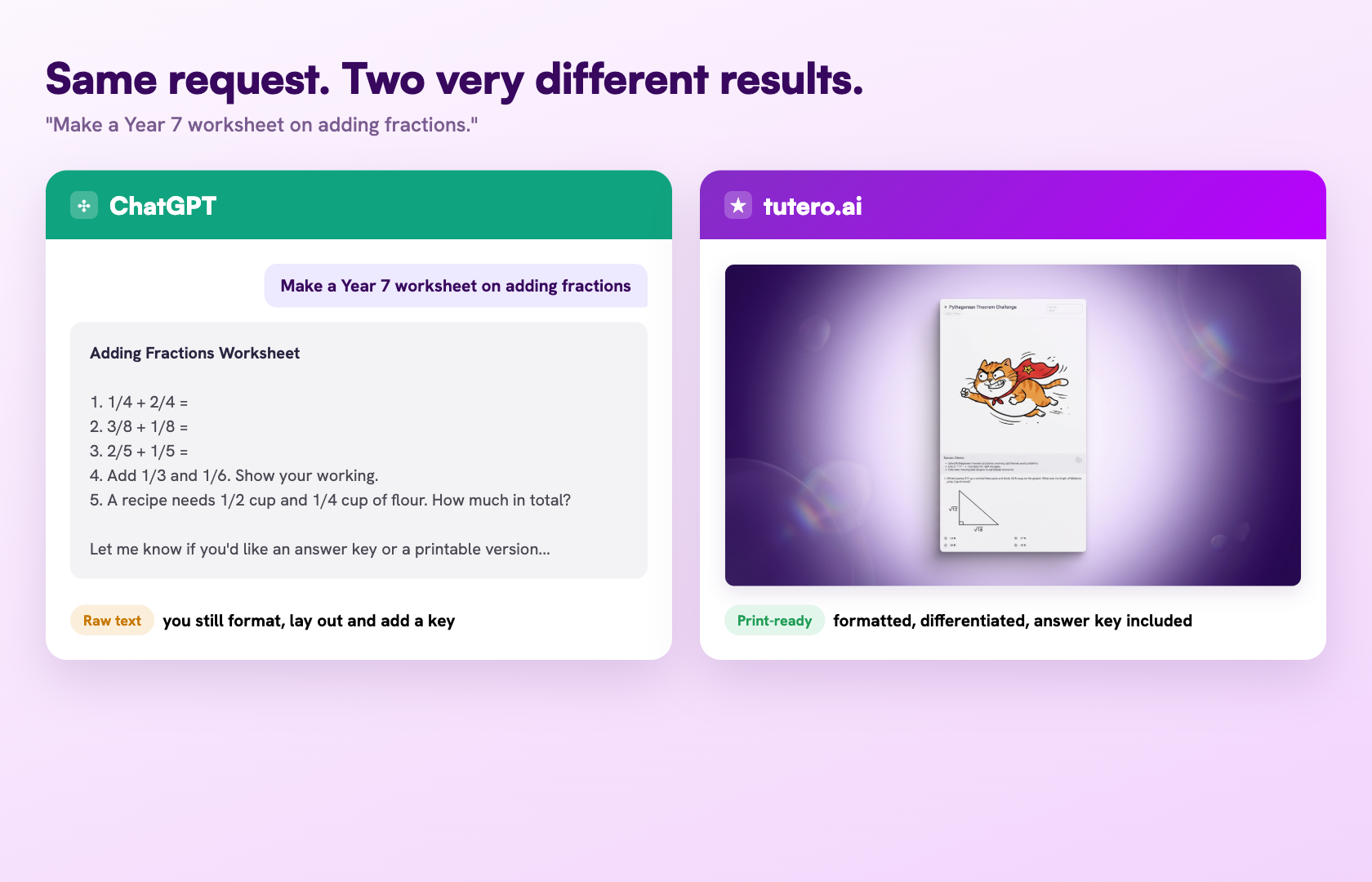
- It gives you raw text, not a resource. Ask for a worksheet and you get a wall of text with no layout, no spacing to write in, and no answer key. You still spend twenty minutes formatting it.
- It doesn't know your curriculum. It matches the topic, not the standard. You have to supply and check the alignment yourself.
- Differentiation is manual. You can ask for three levels, but you ask every time, and you stitch them together.
- It makes things up. ChatGPT can state a wrong fact or a wrong answer with total confidence, so everything it produces needs checking before it reaches a student.
- It can't see your class. It doesn't know who's behind, who's bored, or what you actually taught this week.
- Student data is a real risk. A general chatbot is not the place to paste identifiable student information.
None of this makes ChatGPT bad. It makes it general. For the open-ended language jobs, that's perfect. For a finished, aligned, classroom-ready resource, "general" is exactly the gap.
ChatGPT vs a purpose-built teaching platform
The clearest way to see the difference is job by job. A teaching platform like tutero.ai is built to produce the finished classroom resource — curriculum-aligned, differentiated, print-ready — rather than text you shape yourself.
| The job | ChatGPT | A teaching platform (e.g. tutero.ai) |
|---|---|---|
| Brainstorm ideas and hooks | Excellent | Good |
| Explain or reword a concept | Excellent | Good |
| Draft a parent email | Excellent | Not its focus |
| A print-ready worksheet | Raw text, you format it | Finished, with an answer key |
| Curriculum alignment | You supply and check it | Built in |
| Differentiation | Ask every time | Three levels in one step |
| A quiz with a marking key | Plain text | Auto-marked and aligned |
| Cost | Free tier, paid for more | Free for teachers |
ChatGPT wins the open-ended language jobs. A platform built for teaching wins the moment the output has to be a resource you hand a student.

When to use ChatGPT, and when to use something built for teaching
You don't have to choose one forever. The teachers who get the most from AI use the right tool for the job:
Reach for ChatGPT when the job is language and ideas — brainstorming a hook, rewording a passage, drafting an email, explaining a concept, getting a first draft to react to.
Reach for a teaching platform when the job is a finished resource — a print-ready worksheet, a curriculum-aligned lesson, a differentiated task, a quiz with a key. tutero.ai does these in one step and is free for teachers, so the output arrives ready to use rather than ready to format.

How to fact-check ChatGPT before it reaches a student
Because ChatGPT can be confidently wrong, a quick check before you use anything it produces is non-negotiable. It takes a minute and saves the awkward moment of a wrong answer on the board:
- Spot-check the facts. Pick the two or three claims a student would most likely question, and verify them against a source you trust.
- Redo the answer key yourself. For anything with a right answer, especially in maths, work a couple of the questions by hand. A wrong key is worse than no key.
- Read it at your students' level. Check the reading level and the examples actually fit your class, not a generic one.
- Watch for the wrong context. ChatGPT defaults to American spelling, examples and conventions unless you tell it otherwise.
Treat it like marking a keen student's first draft: usually close, occasionally off, always worth a read before it counts.
ChatGPT and the Australian Curriculum
This is where Australian teachers feel the "general" in general chatbot most. ChatGPT is trained on the whole internet, which is mostly American, so out of the box it doesn't know your curriculum or your context:
- It doesn't know the Australian Curriculum. Ask for "a Year 9 English task" and you'll often get something pitched at an American grade, with American examples. You have to specify "aligned to the Australian Curriculum", or your state syllabus (NESA, the Victorian Curriculum, QCAA and the rest), and check it still fits.
- It defaults to American English. Expect "color", "math" and "fall" unless you tell it to write in Australian English and use "Year" rather than "Grade".
- It's hazy on our assessments. NAPLAN, the ATAR and the senior certificates (HSC, VCE, QCE, WACE and SACE) aren't its strong suit. Spell out the format you need rather than assuming it knows.
- Privacy sits under Australian rules. Australian schools fall under the Privacy Act, and most state education departments now publish their own generative-AI guidance. Check yours before any student data goes near a chatbot.
The fix is the same each time: be explicit about the curriculum, the spelling and the context, then check the result. Or use a platform built with the Australian Curriculum in mind, like tutero.ai, which aligns to it by default and writes in Australian English, so you skip the "make it Australian" step entirely.
Is it safe, and is it allowed?
Two questions worth settling before you lean on ChatGPT in your teaching:
Student data. Don't paste identifiable student information — names, results, IEP details — into a general chatbot. Most planning tasks don't need it: you can describe the lesson or the task without naming a single student. If a tool genuinely needs student data, use one built for schools that states how it handles it.
School policy and integrity. Using AI to plan, draft and reword is now common and, in most schools, encouraged — but check your school's AI policy, because they vary. Keep your professional judgment in the loop: you're accountable for what reaches a student, so read, check and edit before anything goes out. The AI drafts; you decide.
If the job is help me think or help me word this, ChatGPT is genuinely excellent. The trouble starts when the job is give me the finished resource.
If the job is help me think or help me word this, ChatGPT is genuinely excellent. The trouble starts when the job is give me the finished resource.
For most teachers, ChatGPT is the first AI tool they ever try. It's free, it's fast, and it can clearly do something useful with a lesson. But it wasn't built for the classroom, so it's brilliant at some teaching jobs and quietly creates work on others. This guide is the honest version: what ChatGPT is genuinely great at for teachers, how to prompt it so it actually helps, the prompts worth saving, where it falls short for real classroom work, and what to reach for when you need a finished, ready-to-teach resource.
What ChatGPT is genuinely good at for teachers
Let's start with the credit it's due. ChatGPT is a general language model, and the jobs that are mostly about language are exactly where it shines:
- Brainstorming. Lesson hooks, analogies, discussion questions, project ideas — it's a tireless idea partner.
- Explaining and rewording. Turn a dense concept into plain language, or rewrite a passage at an easier reading level.
- Drafting communication. Parent emails, newsletters, report comment starters, a tricky message you're not sure how to word.
- Summarising. Condense an article, a policy or a long text into the key points.
- Getting unstuck. When the blank page is the problem, it gives you a first draft to react to.
If the job is "help me think" or "help me word this," ChatGPT is genuinely excellent, and free. The trouble starts when the job is "give me the finished resource."
How to write a teaching prompt that actually works
Most disappointing ChatGPT output comes from a thin prompt. The fix is to give it the context a colleague would need. A good teaching prompt has five parts:
- Role — "You are a Year 8 science teacher."
- Task — "Write eight comprehension questions."
- Context — the year level, the topic, the standard, the ability range.
- Format — "A mix of recall and short answer, with an answer key."
- Constraints — length, reading level, tone, what to avoid.
Compare the results. "Write some questions about photosynthesis" gives you something generic. "You are a Year 8 science teacher. Write eight short comprehension questions on photosynthesis for mixed-ability students, a mix of recall and reasoning, at a Year 8 reading level, with an answer key" gives you something close to usable. The detail is the difference.
8 ChatGPT prompts for teachers worth saving
These play to ChatGPT's strengths — language, ideas, rewording — so they tend to land well. Copy, then swap in your own brackets.
- Lesson hooks: "Give me 5 engaging ways to open a [year level] lesson on [topic]."
- Explain it simply: "Explain [concept] to a [year level] student in plain language, with one analogy they'd relate to."
- Level a text: "Rewrite this passage at three reading levels — below, at, and above [year level]: [paste text]."
- Parent email: "Turn these rough notes into a warm, clear email to a parent about [situation]: [notes]."
- Discussion questions: "Write 8 discussion questions on [text or topic], ranging from recall to evaluation."
- Common misconceptions: "List the 5 most common misconceptions students have about [topic], and how to address each."
- Real-world examples: "Give me 6 real-world examples of [concept] that would interest [year level] students."
- Feedback starters: "Write 10 constructive feedback sentence starters for [skill or task]."
Where ChatGPT falls short for the classroom
Here's the honest other half. ChatGPT wasn't designed for teaching, and it shows the moment you need something you can put in front of a class:
- It gives you raw text, not a resource. Ask for a worksheet and you get a wall of text with no layout, no spacing to write in, and no answer key. You still spend twenty minutes formatting it.
- It doesn't know your curriculum. It matches the topic, not the standard. You have to supply and check the alignment yourself.
- Differentiation is manual. You can ask for three levels, but you ask every time, and you stitch them together.
- It makes things up. ChatGPT can state a wrong fact or a wrong answer with total confidence, so everything it produces needs checking before it reaches a student.
- It can't see your class. It doesn't know who's behind, who's bored, or what you actually taught this week.
- Student data is a real risk. A general chatbot is not the place to paste identifiable student information.
None of this makes ChatGPT bad. It makes it general. For the open-ended language jobs, that's perfect. For a finished, aligned, classroom-ready resource, "general" is exactly the gap.
ChatGPT vs a purpose-built teaching platform
The clearest way to see the difference is job by job. A teaching platform like tutero.ai is built to produce the finished classroom resource — curriculum-aligned, differentiated, print-ready — rather than text you shape yourself.
| The job | ChatGPT | A teaching platform (e.g. tutero.ai) |
|---|---|---|
| Brainstorm ideas and hooks | Excellent | Good |
| Explain or reword a concept | Excellent | Good |
| Draft a parent email | Excellent | Not its focus |
| A print-ready worksheet | Raw text, you format it | Finished, with an answer key |
| Curriculum alignment | You supply and check it | Built in |
| Differentiation | Ask every time | Three levels in one step |
| A quiz with a marking key | Plain text | Auto-marked and aligned |
| Cost | Free tier, paid for more | Free for teachers |
ChatGPT wins the open-ended language jobs. A platform built for teaching wins the moment the output has to be a resource you hand a student.
When to use ChatGPT, and when to use something built for teaching
You don't have to choose one forever. The teachers who get the most from AI use the right tool for the job:
Reach for ChatGPT when the job is language and ideas — brainstorming a hook, rewording a passage, drafting an email, explaining a concept, getting a first draft to react to.
Reach for a teaching platform when the job is a finished resource — a print-ready worksheet, a curriculum-aligned lesson, a differentiated task, a quiz with a key. tutero.ai does these in one step and is free for teachers, so the output arrives ready to use rather than ready to format.
How to fact-check ChatGPT before it reaches a student
Because ChatGPT can be confidently wrong, a quick check before you use anything it produces is non-negotiable. It takes a minute and saves the awkward moment of a wrong answer on the board:
- Spot-check the facts. Pick the two or three claims a student would most likely question, and verify them against a source you trust.
- Redo the answer key yourself. For anything with a right answer, especially in maths, work a couple of the questions by hand. A wrong key is worse than no key.
- Read it at your students' level. Check the reading level and the examples actually fit your class, not a generic one.
- Watch for the wrong context. ChatGPT defaults to American spelling, examples and conventions unless you tell it otherwise.
Treat it like marking a keen student's first draft: usually close, occasionally off, always worth a read before it counts.
ChatGPT and the Australian Curriculum
This is where Australian teachers feel the "general" in general chatbot most. ChatGPT is trained on the whole internet, which is mostly American, so out of the box it doesn't know your curriculum or your context:
- It doesn't know the Australian Curriculum. Ask for "a Year 9 English task" and you'll often get something pitched at an American grade, with American examples. You have to specify "aligned to the Australian Curriculum", or your state syllabus (NESA, the Victorian Curriculum, QCAA and the rest), and check it still fits.
- It defaults to American English. Expect "color", "math" and "fall" unless you tell it to write in Australian English and use "Year" rather than "Grade".
- It's hazy on our assessments. NAPLAN, the ATAR and the senior certificates (HSC, VCE, QCE, WACE and SACE) aren't its strong suit. Spell out the format you need rather than assuming it knows.
- Privacy sits under Australian rules. Australian schools fall under the Privacy Act, and most state education departments now publish their own generative-AI guidance. Check yours before any student data goes near a chatbot.
The fix is the same each time: be explicit about the curriculum, the spelling and the context, then check the result. Or use a platform built with the Australian Curriculum in mind, like tutero.ai, which aligns to it by default and writes in Australian English, so you skip the "make it Australian" step entirely.
Is it safe, and is it allowed?
Two questions worth settling before you lean on ChatGPT in your teaching:
Student data. Don't paste identifiable student information — names, results, IEP details — into a general chatbot. Most planning tasks don't need it: you can describe the lesson or the task without naming a single student. If a tool genuinely needs student data, use one built for schools that states how it handles it.
School policy and integrity. Using AI to plan, draft and reword is now common and, in most schools, encouraged — but check your school's AI policy, because they vary. Keep your professional judgment in the loop: you're accountable for what reaches a student, so read, check and edit before anything goes out. The AI drafts; you decide.
If the job is help me think or help me word this, ChatGPT is genuinely excellent. The trouble starts when the job is give me the finished resource.
If the job is help me think or help me word this, ChatGPT is genuinely excellent. The trouble starts when the job is give me the finished resource.

If the job is help me think or help me word this, ChatGPT is genuinely excellent. The trouble starts when the job is give me the finished resource.
ChatGPT wins the open-ended language jobs. A platform built for teaching wins the moment the output has to be a resource you hand a student.
For most teachers, ChatGPT is the first AI tool they ever try. It's free, it's fast, and it can clearly do something useful with a lesson. But it wasn't built for the classroom, so it's brilliant at some teaching jobs and quietly creates work on others. This guide is the honest version: what ChatGPT is genuinely great at for teachers, how to prompt it so it actually helps, the prompts worth saving, where it falls short for real classroom work, and what to reach for when you need a finished, ready-to-teach resource.
What ChatGPT is genuinely good at for teachers
Let's start with the credit it's due. ChatGPT is a general language model, and the jobs that are mostly about language are exactly where it shines:
- Brainstorming. Lesson hooks, analogies, discussion questions, project ideas — it's a tireless idea partner.
- Explaining and rewording. Turn a dense concept into plain language, or rewrite a passage at an easier reading level.
- Drafting communication. Parent emails, newsletters, report comment starters, a tricky message you're not sure how to word.
- Summarising. Condense an article, a policy or a long text into the key points.
- Getting unstuck. When the blank page is the problem, it gives you a first draft to react to.
If the job is "help me think" or "help me word this," ChatGPT is genuinely excellent, and free. The trouble starts when the job is "give me the finished resource."
How to write a teaching prompt that actually works
Most disappointing ChatGPT output comes from a thin prompt. The fix is to give it the context a colleague would need. A good teaching prompt has five parts:
- Role — "You are a Year 8 science teacher."
- Task — "Write eight comprehension questions."
- Context — the year level, the topic, the standard, the ability range.
- Format — "A mix of recall and short answer, with an answer key."
- Constraints — length, reading level, tone, what to avoid.
Compare the results. "Write some questions about photosynthesis" gives you something generic. "You are a Year 8 science teacher. Write eight short comprehension questions on photosynthesis for mixed-ability students, a mix of recall and reasoning, at a Year 8 reading level, with an answer key" gives you something close to usable. The detail is the difference.
8 ChatGPT prompts for teachers worth saving
These play to ChatGPT's strengths — language, ideas, rewording — so they tend to land well. Copy, then swap in your own brackets.
- Lesson hooks: "Give me 5 engaging ways to open a [year level] lesson on [topic]."
- Explain it simply: "Explain [concept] to a [year level] student in plain language, with one analogy they'd relate to."
- Level a text: "Rewrite this passage at three reading levels — below, at, and above [year level]: [paste text]."
- Parent email: "Turn these rough notes into a warm, clear email to a parent about [situation]: [notes]."
- Discussion questions: "Write 8 discussion questions on [text or topic], ranging from recall to evaluation."
- Common misconceptions: "List the 5 most common misconceptions students have about [topic], and how to address each."
- Real-world examples: "Give me 6 real-world examples of [concept] that would interest [year level] students."
- Feedback starters: "Write 10 constructive feedback sentence starters for [skill or task]."
Where ChatGPT falls short for the classroom
Here's the honest other half. ChatGPT wasn't designed for teaching, and it shows the moment you need something you can put in front of a class:
- It gives you raw text, not a resource. Ask for a worksheet and you get a wall of text with no layout, no spacing to write in, and no answer key. You still spend twenty minutes formatting it.
- It doesn't know your curriculum. It matches the topic, not the standard. You have to supply and check the alignment yourself.
- Differentiation is manual. You can ask for three levels, but you ask every time, and you stitch them together.
- It makes things up. ChatGPT can state a wrong fact or a wrong answer with total confidence, so everything it produces needs checking before it reaches a student.
- It can't see your class. It doesn't know who's behind, who's bored, or what you actually taught this week.
- Student data is a real risk. A general chatbot is not the place to paste identifiable student information.
None of this makes ChatGPT bad. It makes it general. For the open-ended language jobs, that's perfect. For a finished, aligned, classroom-ready resource, "general" is exactly the gap.
ChatGPT vs a purpose-built teaching platform
The clearest way to see the difference is job by job. A teaching platform like tutero.ai is built to produce the finished classroom resource — curriculum-aligned, differentiated, print-ready — rather than text you shape yourself.
| The job | ChatGPT | A teaching platform (e.g. tutero.ai) |
|---|---|---|
| Brainstorm ideas and hooks | Excellent | Good |
| Explain or reword a concept | Excellent | Good |
| Draft a parent email | Excellent | Not its focus |
| A print-ready worksheet | Raw text, you format it | Finished, with an answer key |
| Curriculum alignment | You supply and check it | Built in |
| Differentiation | Ask every time | Three levels in one step |
| A quiz with a marking key | Plain text | Auto-marked and aligned |
| Cost | Free tier, paid for more | Free for teachers |
ChatGPT wins the open-ended language jobs. A platform built for teaching wins the moment the output has to be a resource you hand a student.
When to use ChatGPT, and when to use something built for teaching
You don't have to choose one forever. The teachers who get the most from AI use the right tool for the job:
Reach for ChatGPT when the job is language and ideas — brainstorming a hook, rewording a passage, drafting an email, explaining a concept, getting a first draft to react to.
Reach for a teaching platform when the job is a finished resource — a print-ready worksheet, a curriculum-aligned lesson, a differentiated task, a quiz with a key. tutero.ai does these in one step and is free for teachers, so the output arrives ready to use rather than ready to format.
How to fact-check ChatGPT before it reaches a student
Because ChatGPT can be confidently wrong, a quick check before you use anything it produces is non-negotiable. It takes a minute and saves the awkward moment of a wrong answer on the board:
- Spot-check the facts. Pick the two or three claims a student would most likely question, and verify them against a source you trust.
- Redo the answer key yourself. For anything with a right answer, especially in maths, work a couple of the questions by hand. A wrong key is worse than no key.
- Read it at your students' level. Check the reading level and the examples actually fit your class, not a generic one.
- Watch for the wrong context. ChatGPT defaults to American spelling, examples and conventions unless you tell it otherwise.
Treat it like marking a keen student's first draft: usually close, occasionally off, always worth a read before it counts.
ChatGPT and the Australian Curriculum
This is where Australian teachers feel the "general" in general chatbot most. ChatGPT is trained on the whole internet, which is mostly American, so out of the box it doesn't know your curriculum or your context:
- It doesn't know the Australian Curriculum. Ask for "a Year 9 English task" and you'll often get something pitched at an American grade, with American examples. You have to specify "aligned to the Australian Curriculum", or your state syllabus (NESA, the Victorian Curriculum, QCAA and the rest), and check it still fits.
- It defaults to American English. Expect "color", "math" and "fall" unless you tell it to write in Australian English and use "Year" rather than "Grade".
- It's hazy on our assessments. NAPLAN, the ATAR and the senior certificates (HSC, VCE, QCE, WACE and SACE) aren't its strong suit. Spell out the format you need rather than assuming it knows.
- Privacy sits under Australian rules. Australian schools fall under the Privacy Act, and most state education departments now publish their own generative-AI guidance. Check yours before any student data goes near a chatbot.
The fix is the same each time: be explicit about the curriculum, the spelling and the context, then check the result. Or use a platform built with the Australian Curriculum in mind, like tutero.ai, which aligns to it by default and writes in Australian English, so you skip the "make it Australian" step entirely.
Is it safe, and is it allowed?
Two questions worth settling before you lean on ChatGPT in your teaching:
Student data. Don't paste identifiable student information — names, results, IEP details — into a general chatbot. Most planning tasks don't need it: you can describe the lesson or the task without naming a single student. If a tool genuinely needs student data, use one built for schools that states how it handles it.
School policy and integrity. Using AI to plan, draft and reword is now common and, in most schools, encouraged — but check your school's AI policy, because they vary. Keep your professional judgment in the loop: you're accountable for what reaches a student, so read, check and edit before anything goes out. The AI drafts; you decide.
If the job is help me think or help me word this, ChatGPT is genuinely excellent. The trouble starts when the job is give me the finished resource.
ChatGPT wins the open-ended language jobs. A platform built for teaching wins the moment the output has to be a resource you hand a student.
.svg)
.svg)
Yes, ChatGPT has a free tier that covers most teaching tasks, with paid plans for heavier use. tutero.ai is also free for teachers and is built to return finished, classroom-ready resources rather than raw text.
Treat a general chatbot as public. Do not paste identifiable student information, such as names, results or IEP details, into ChatGPT. Most teaching tasks do not need it: describe the lesson or task without naming students. For anything involving student data, use a tool built for schools that states how it handles it.
It can draft one, but as raw text, with no formatting, no answer key, and alignment you have to supply and check. It is a strong first draft for the ideas. For a print-ready, curriculum-aligned resource, a purpose-built platform like tutero.ai finishes the job in one step.
Using AI to plan, draft and reword is now common and, in most schools, encouraged for teachers. Policies vary, so check your school's AI guidelines. The principle that keeps you safe is that you stay accountable, so read, check and edit anything before it reaches a student.
Give it the context a colleague would need: your role, the task, the year level, the topic or standard, the format you want, and any constraints. A specific prompt is the single biggest difference between generic output and something usable.
For finished resources such as worksheets, lessons, quizzes and slides, a platform built for teaching beats a general chatbot, because it aligns to your curriculum, differentiates, and produces print-ready output. tutero.ai is free for teachers and built for exactly that. Keep ChatGPT for brainstorming, rewording and drafting.
Hoping to improve confidence & grades?

.png)